Modules
This tab guide was last updated for Admin Tablet 7.0.0.
What are modules?
Modules are parts of the tablet that you can add/remove to tweak its functionality. Every action on the tablet is a module and you can add as many as you want. Modules are connected to tabs, which are the pages of the tablet. You can add/remove modules from tabs and tweak their settings.
Adding Modules
To add a module, go to the main tablet script. Under the "Modules" foldout you will find 2 dropdowns, one to select the module you want to add and the other for the tab you want to add it to. You can also add modules manually by drag and dropping them from the prefabs folder or adding them as components. You can remove modules by clicking on the red X next to them or by removing them from the hierarchy.

Modules are sorted by tab. Modules that are not inside of any tab will be placed on the Orphaned Modules section, this usually means there is a problem with the module but its not always the case (for example, the camera module).
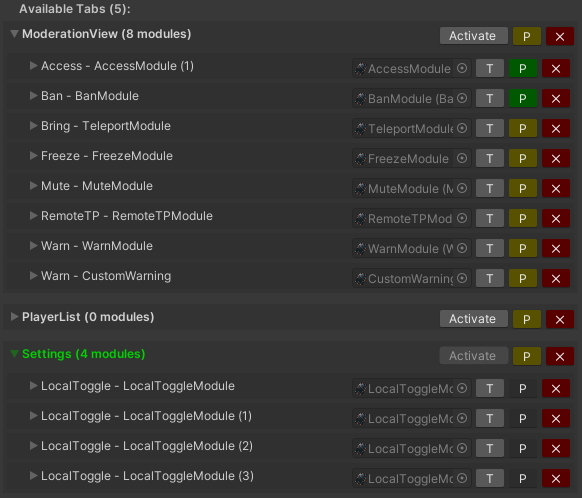
The modules list should automatically update, if not you can force an update using the Get Connected Modules button, make sure all your tablet modules are listed otherwise they may not work correctly!
Tweaking Module settings
Each module has its own settings, you will see a list of all connected modules on the main tablet script, you can edit each of its settings from there. You can also edit them directly from their gameobjects.
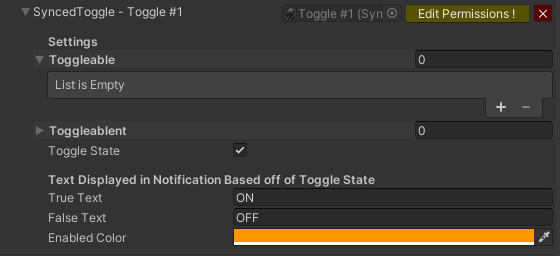
You can edit some of the labels that come with the default modules using the T button.
if you wish to edit images, or other button settings you will need to do so directly on the modules gameobject. You can access them easily by clicking on the reference to the module script.
Restricting access to modules
You can use the Edit Permissions (P) button to add Permission Tags required to use the module. The button will turn from yellow to green when the tags are set. To disable permissions completely on a module simply leave the tags empty.
Permission Tags will act differently depending on the selected Security Mode.
The admin tablet is not designed as a permission manager, we recommend using a third party solution. If you want a permission system that is 100% compatible and that expands the tablet functionality even more, check out the SecurityKeypad
Modules List
Local Toggle Module
A simple local toggle of objects. Used by the defaults settings tab.
| Setting | Purpose |
|---|---|
| ToggleOnObjects | List of objects that will be turned on when the toggle state is True. |
| ToggleOffObjects | List of objects that will be turned off when the toggle state is True. |
| Button | Reference to the button used to toggle, used to update the checkmark. |
| Checkmark | Reference to the checkmark image, used to toggle it depending on the state of the toggle. |
| State | Default value of the toggle. |
| DisableOnQuest | If true, this toggles interactability will be disabled on android & ios platforms. |
Local TP Module
Teleports the local user to the target position.
| Setting | Purpose |
|---|---|
| Zone : Transform | position where the user will be teleported. |
Local Chain Toggle Module
Add multile list of objects, only one can be active at a time.
Global TP Module
Teleports everyone to the target position.
| Setting | Purpose |
|---|---|
| Target : Transform | position where the users will be teleported. |
| TeleportCaster : bool | if true, also teleports you when pressed. |
Bringall Module
Teleports everyone to you.
Announcement Module
Displays a message in everyones screen for a couple of seconds.
Synced Toggle Module
Turns on/off a set of objects for everyone in the instance.
| Setting | Purpose |
|---|---|
| Toggleables : GameObject[] | List of objects that will be turned on when the toggle state is True. |
| Toggleablents GameObject[] | List of objects that will be turned off when the toggle state is True. |
| ToggleState : bool | Default value of the synced toggle. |
| TrueText : string | Text that will be displayed on the notification when the toggle state is True. |
| FalseText : string | Text that will be displayed on the notification when the toggle state is False. |
| EnabledColor : Color | Color to change the button to when the toggle state is True. |
Global Chain Toggle Module
Same as the Local Chain Toggle Module but synced for everyone in the instance.
ObjectRespawn Module
Respawns a list of synced objects.
| Setting | Purpose |
|---|---|
| RespawnObjects : VRCObjectSync[] | List of objects to respawn. |
Warn Module
Displays a message in the targets user screen.
| Setting | Purpose |
|---|---|
| Text : TextMeshProUGUI | Text component used to get the warn message from. |
Bring Module
Teleports the target user to you.
Goto Module
Teleports you to the target user.
Freeze Module
Makes the target user unable to move.
Mute/Deafen Module
Makes the target user unable to talk/hear.
| Setting | Purpose |
|---|---|
| DefaultVoice : float | The default VoiceDistanceFar value, used to reset the voice of a user that was unmuted. |
| UnmuteOnDisconnect : bool | If true, if a user leaves the instance they will be removed from the muted list. |
Ban Module
Sends the user to a specific point, sets their spawn there and (optionally) freezes them.
| Setting | Purpose |
|---|---|
| Banzone : transform | BanLocation |
| ShouldFreeze : bool | if true, freezes the player when banning them. |
Remote TP Module
Teleports the target user to the target position
| Setting | Purpose |
|---|---|
| Zone : transform | position where the user will be teleported. |
Follower Camera
Used to display the view of the target player on the profile tab.
| Setting | Purpose |
|---|---|
| FPS : int | refresh rate of the camera, lower to increase performance. |
Addons
Addons are modules that depend on 3rd party assets or that have been created by the community. They are provided as is and are not supported. If you created a a custom module that you want added to the main files, contact me on discord!
Access Module
Grants the target user a KeyPadRol from the SecurityKeypad
| Setting | Purpose |
|---|---|
| VipRole : KeyPadRol | The KeyPadRol to grant the user. |