Instalación
- Importa ValenCommons desde mi listado público de VCC⚠️
- Importa FloatingTags.unitypackage
- Localiza el prefab Crowns dentro de
Packages/Valenvrc - FloatingTags/Runtime/y arrástralo a tu escena.
Crown Handlers
Los CrownHandlers son responsables de almacenar qué Corona tiene un jugador y moverlas encima de su cabeza. Si deseas más de 1 corona por jugador necesitarás duplicar el handler.
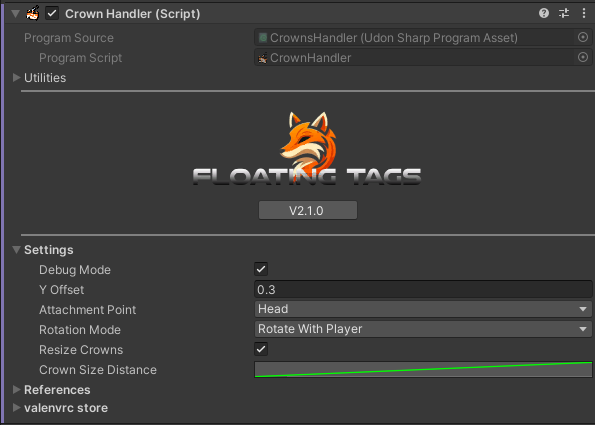
Settings
- DebugMode : bool - Imprime mensajes de depuración adicionales en consola.
- Y Offset : float - Distancia en el eje Y desde el punto de unión.
- AttachmentPoint : VRCPlayerApi.TrackingDataType - Lugar objetivo para poner la corona.
- RotationMode
- None - La corona no rotará.
- With Player - Rotará para coincidir con la rotación del jugador que tiene la corona.
- To LocalPlayer - Rotará para siempre mirar al jugador local.
- ResizeCrowns : bool - Habilita el redimensionamiento de corona basado en distancia.
- CrownSizeDistance : Curve - Controla el redimensionamiento de distancia usando una curva.
References
ActiveCrowns : GameObject - GameObject que almacena la corona de cada jugador.
Si deseas crear un toggle de coronas, no deshabilites el sistema en sí, ¡deshabilita el gameobject ActiveCrowns!
Crear Coronas
Las coronas son los diferentes diseños que se pondrán en los jugadores. Necesitan ser colocadas como hijos de un CrownHandler. Todas las coronas tienen una Template (llamada dummy por defecto), puedes poner cualquier cosa dentro de ella para que se muestre en tus jugadores, por defecto es solo texto pero puedes agregar sprites, partículas, gameobjects o una combinación de todo!
Player List
Cada corona viene con una lista de jugadores, aquí puedes agregar nombres de jugadores a quienes se les otorgará esta corona al unirse.
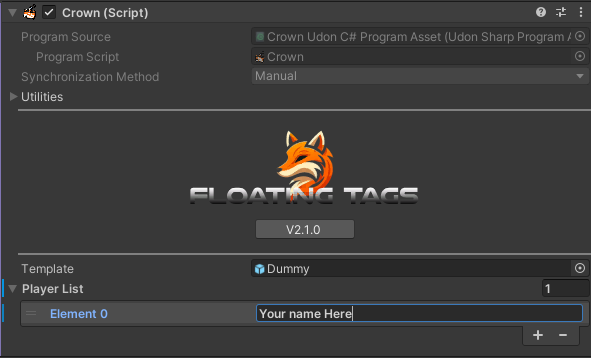
No pongas un nombre de usuario en más de 1 lista de jugadores de corona del mismo crownhandler, ¡llevará a comportamiento indefinido!